Ergonomic Sitting Height Calculator
Does your back ache by 2 PM? Is your neck stiff from staring at a screen that feels too low? You might be sitting at the wrong height. We spend roughly one-third of our lives sitting, yet most of us treat our chairs like static furniture rather than adjustable tools. The question isn't just about comfort; it's about biology. Your spine, hips, and shoulders have specific geometric requirements to function without strain. Getting this right can mean the difference between chronic pain and sustained energy throughout the workday.
The short answer is that neither "lower" nor "higher" is universally better. Instead, the goal is neutral alignment. This means your body parts are stacked in a way that minimizes stress on joints and muscles. When we talk about sitting height, we aren't just talking about how high the seat is off the ground. We are talking about the relationship between your hips, knees, feet, elbows, and eyes. Let's break down exactly where you should be.
The Foundation: Hip and Knee Alignment
Start with your lower body. This is the base of your posture pyramid. If your foundation is unstable, everything above it-your spine, neck, and head-will compensate, leading to fatigue and injury. The golden rule for sitting height is the 90-degree angle.
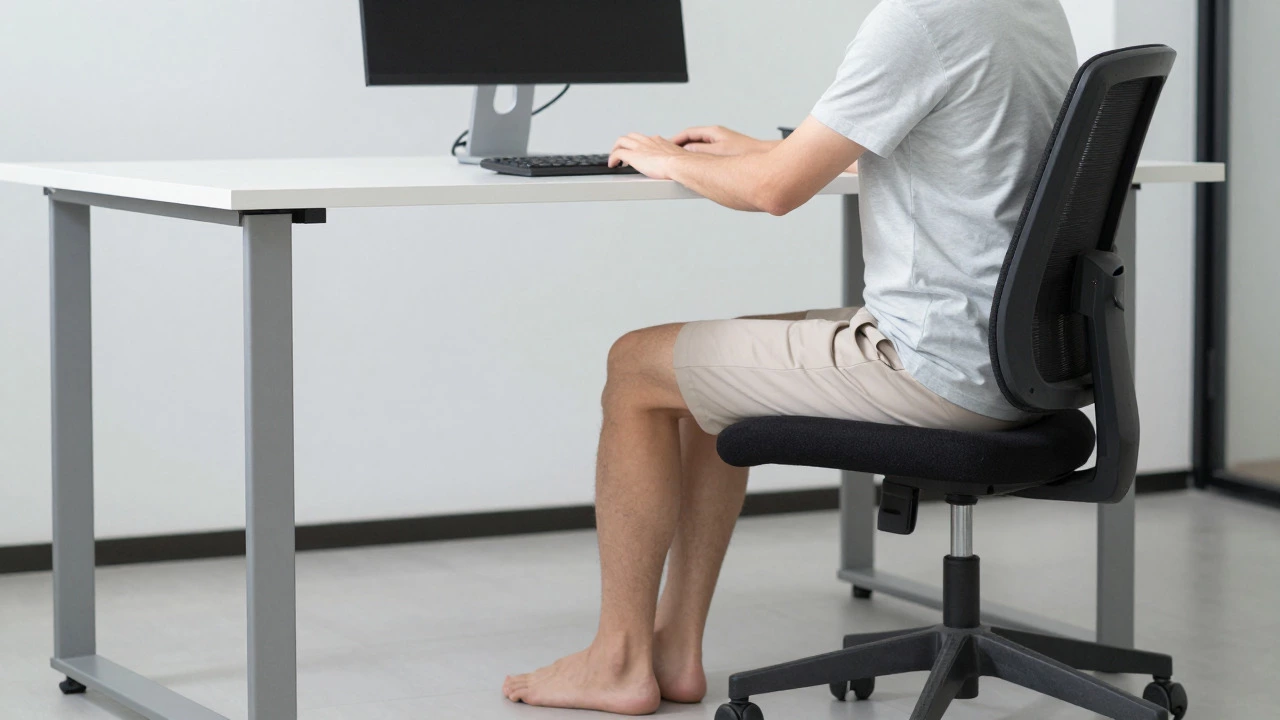
Your thighs should be parallel to the floor. Your knees should form a 90-degree angle (or slightly more open, around 100 degrees) when your feet are flat on the ground. Why does this matter? When you sit too high, your thighs dangle. This cuts off blood flow to your legs because the edge of the seat presses into the back of your thighs. It also forces you to lean forward to reach the keyboard, straining your lower back.
Conversely, if you sit too low, your knees rise above your hips. This puts pressure on the front of your knee joint and makes it harder to engage your core muscles properly. You might feel "cozy," but you are actually compressing your hip flexors. Over time, tight hip flexors pull on your lumbar spine, causing that familiar lower back ache.
- Ideal: Feet flat on the floor, thighs parallel to the ground, knees at 90-100 degrees.
- Too High: Feet dangling or resting on a small footrest, pressure behind the knees, forward lean required.
- Too Low: Knees higher than hips, difficulty moving feet, compressed hip joints.
If your desk is fixed and standard height (usually 72 cm or 28 inches), and you find yourself needing to sit very low to keep your feet flat, your desk might actually be too high for you. In this case, raising your chair until your feet touch the floor is the priority. If your feet still don't touch, use a footrest. Never sacrifice knee angle for foot placement.
The Upper Body: Elbows and Shoulders
Once your lower body is set, look at your arms. Your elbows should rest comfortably at your sides, forming a 90-to-100-degree angle when typing. Your forearms should be parallel to the floor. This ensures that your shoulders stay relaxed and down, not hunched up toward your ears.
Here is where the "sitting higher" argument often comes from. Many people believe that sitting higher allows them to reach the keyboard without leaning. However, if you raise your chair to get your elbows level with the desk, your feet will likely leave the floor. This creates a conflict. Which do you prioritize?
You must prioritize the lower body. Keep your feet flat and your thighs supported. Then, adjust your chair height so your elbows are close to the desk surface. If your elbows are hanging below the desk, the desk is too high relative to your arm length, not necessarily your sitting height. If your shoulders are shrugging up to meet the desk, the desk is too high, or your chair is too low. In an ideal ergonomic setup, you adjust the chair height for your legs first, then ensure the desk surface matches your elbow height. If they don't match, you need adjustable equipment.
The Screen Factor: Eye Level Matters
Sitting height doesn't exist in a vacuum. It is tied directly to where your eyes look. The top of your monitor should be at or slightly below eye level. You should be looking slightly downward at the center of the screen, not straight ahead or up.
If you sit too low, you might crane your neck upward to see the screen. This compresses the cervical spine and leads to tension headaches. If you sit too high, you might tuck your chin to look down, which can strain the back of your neck. The key is that your head should be balanced over your spine, not jutting forward.
When you adjust your chair height for your legs and elbows, check your screen position. If your screen is now too high, you need a monitor riser or a laptop stand. If it's too low, raise the monitor. Do not change your sitting height to accommodate a poorly placed screen. The screen moves to fit you, not the other way around.
Sit-Stand Desks: The Middle Ground?
In recent years, sit-stand desks have become popular. They allow you to alternate between sitting and standing, which reduces the static load on your spine. But does this change the rules for sitting height? No. The principles remain the same. When you are in the sitting position on a sit-stand desk, you still need your feet flat, thighs parallel, and elbows at 90 degrees.
Some people think that because they can stand, they can sit in any weird position. This is dangerous. Sitting improperly for four hours causes just as much damage as sitting properly for eight. The benefit of a sit-stand desk is movement, not poor posture. Use the standing mode to reset your hips and stretch your legs, but return to a neutral sitting position when you need focus.
| Feature | Sitting Too Low | Sitting Too High | Ideal Neutral Posture |
|---|---|---|---|
| Knee Angle | > 90 degrees (knees high) | < 90 degrees (legs dangling) | 90-100 degrees |
| Foot Position | Flat on floor | Dangling or on footrest | Flat on floor or footrest |
| Hip Pressure | High on hip flexors | Pressure behind thighs | Evenly distributed |
| Elbow Height | Often below desk | Often above desk | Level with desk surface |
| Spinal Load | Increased lumbar curve | Forward lean strain | Neutral spine alignment |
Common Mistakes People Make
One common error is ignoring the chair's tilt. Most modern office chairs allow you to recline slightly. A slight recline (100-110 degrees) actually reduces pressure on the discs in your lower back compared to sitting perfectly upright at 90 degrees. If you sit bolt upright, you rely entirely on muscle strength to hold your posture. A slight tilt lets gravity help support your weight.
Another mistake is using a cushion to fix a bad chair. While a lumbar roll can help support your lower back, it cannot fix a seat pan that is too deep or too shallow. If the edge of the seat digs into your hamstrings, no cushion will solve that. You need to adjust the seat depth or choose a different chair.
Finally, many people forget about their wrists. If your wrists are bent upward or downward while typing, you are at risk for carpal tunnel syndrome. Your wrists should float straight, not rest on the hard edge of the desk. Consider a wrist rest for your mouse, but avoid resting your wrists while actively typing.
How to Adjust Your Setup Today
You don't need expensive gear to start. Follow these steps to optimize your current setup:
- Set Chair Height: Lift or lower your seat until your feet are flat on the floor and your thighs are parallel to the ground. Your knees should be at a 90-degree angle.
- Check Armrests: If your chair has armrests, adjust them so your shoulders relax. If they push your shoulders up, lower them or remove them. Your elbows should rest lightly on them or hang freely near the desk.
- Position Monitor: Raise or lower your screen so the top third is at eye level. You should read the screen without tilting your head up or down.
- Add Footrest if Needed: If your feet don't touch the floor even at the lowest setting, buy a sturdy footrest. Place your feet on it to maintain the 90-degree knee angle.
- Test Typing Comfort: Type for five minutes. Do your shoulders hike up? Lower the desk or raise the chair slightly. Do your wrists bend? Adjust your keyboard position.
Remember, ergonomics is personal. Your leg length, torso length, and flexibility are unique. What works for your colleague might hurt you. Trust your body. If something feels strained after ten minutes, it's wrong. Adjust until you feel supported, not forced.
When to Seek Professional Help
If you have chronic back pain, sciatica, or previous injuries, general guidelines might not be enough. Consult a physical therapist or an occupational health specialist. They can assess your specific biomechanics and recommend custom adjustments or equipment. Ignoring persistent pain can lead to long-term damage. Your health is worth more than a quick fix.
Should my knees be higher or lower than my hips?
Your knees should be slightly lower than or level with your hips. Ideally, your thighs are parallel to the floor. If your knees are higher than your hips, you are sitting too low, which compresses your hip joints and strains your lower back.
Is it better to sit with feet flat or crossed?
Feet should be flat on the floor or a footrest. Crossing your legs tilts your pelvis, which curves your spine unnaturally. This puts uneven pressure on your vertebrae and can cause back pain over time. Keep both feet grounded for stability.
How high should my monitor be?
The top of your monitor should be at or slightly below eye level. You should look slightly downward at the center of the screen. This keeps your neck in a neutral position, preventing strain on your cervical spine.
What if I'm tall and my feet don't touch the floor?
If you are tall, raise your chair until your elbows align with the desk. Then, use a footrest to support your feet. This maintains proper knee angles and circulation while keeping your upper body aligned with your workspace.
Can sitting too high cause varicose veins?
Yes. Sitting too high can cut off blood flow behind your knees due to pressure from the seat edge. Poor circulation over long periods can contribute to varicose veins. Ensure there is a gap of two fingers between the seat edge and the back of your knees.
Should I lock my chair tilt or let it recline?
A slight recline (100-110 degrees) is often healthier than sitting perfectly upright. It reduces pressure on spinal discs. Lock the tilt only if you need precise stability for tasks like drawing or detailed data entry. Otherwise, allow gentle movement.
How often should I change my sitting position?
No single position is perfect for long periods. Change your posture every 20-30 minutes. Stand up, stretch, or shift your weight. Static loading is what causes fatigue. Movement is the best medicine for your spine.
Do I need an ergonomic chair?
An adjustable ergonomic chair helps, but correct usage matters more. A cheap chair adjusted correctly is better than an expensive one used poorly. Look for seat height adjustment, lumbar support, and armrest adjustment as minimum features.